


- CompressConvertAI PDF
- Organize
- View & Edit
- Convert from PDF
- Convert to PDF
- SignMoreScan
- Home
- ›
- ›How to Redact Sensitive Financial Data in a Bank Statement PDF
How to Redact Sensitive Financial Data in a Bank Statement PDF
Need to hide personal info in your PDF bank statement before sharing it? Here’s how to redact a bank statement safely using an online redaction tool.
Redacting a bank statement means permanently removing private details—like account numbers, names, and transaction notes—so they can’t be viewed, copied, or recovered.
This guide walks you through the exact steps to black out sensitive data on desktop or mobile, what information you should always redact, and the mistakes that make people accidentally expose their financial details.
You’ll also learn the legal basics of redacting financial documents and how to confirm your redactions are truly permanent. Whether you’re submitting a statement for a rental application, a loan review, or employment verification, these steps will help you protect your privacy every time.
How to Redact a Bank Statement PDF
Quick start: Use the redaction tool below to upload your bank statement and permanently remove sensitive details.
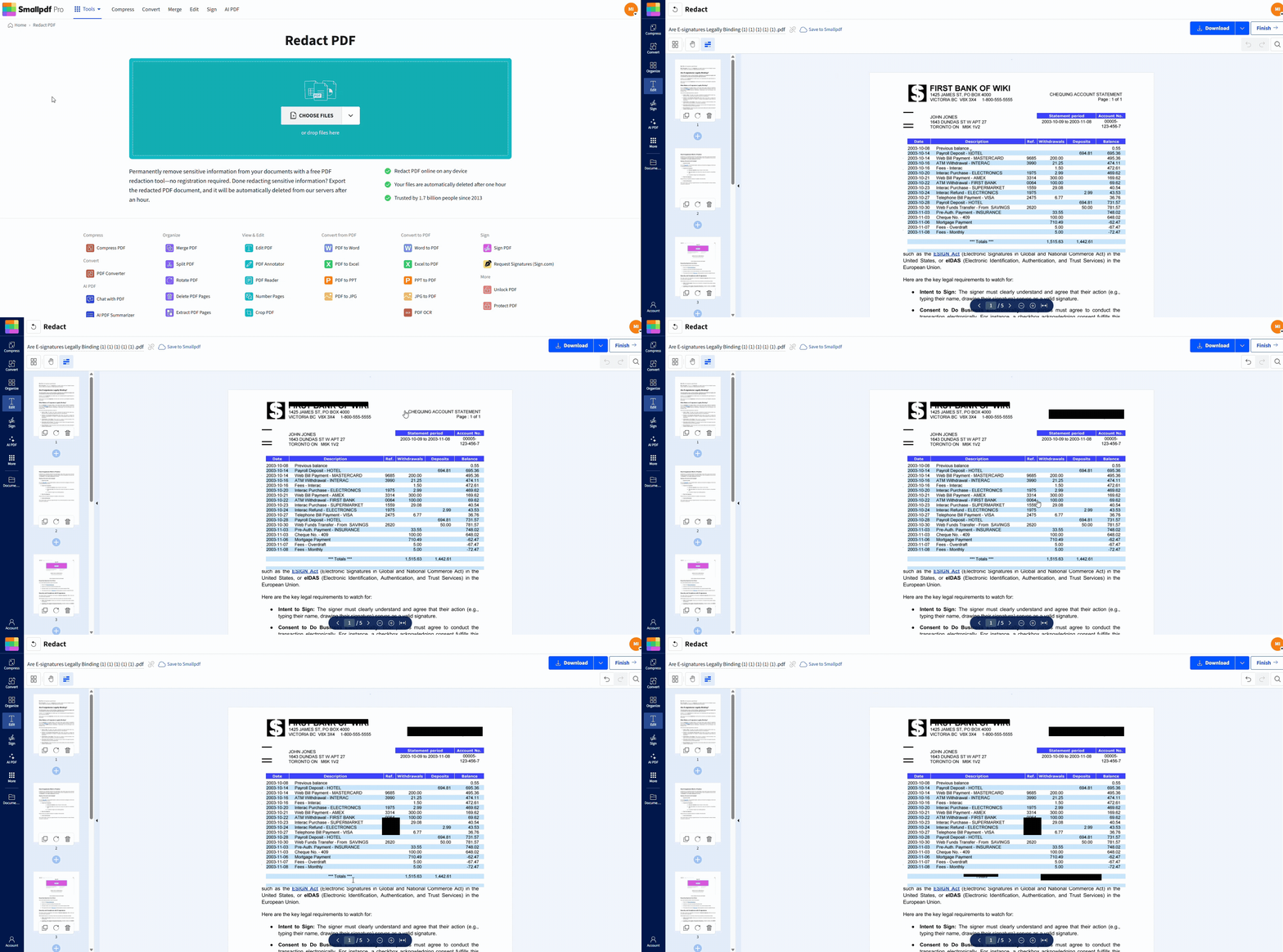
How to Redact Bank Statement PDF on Your Phone
Download Smallpdf Mobile App Today
What Is a Redacted Bank Statement
A redacted bank statement is a document where selected information has been blacked out or hidden to protect personal or sensitive data. Here’s what’s usually redacted:
Account numbers
Bank routing numbers
Full names or addresses
Transaction notes with personal details
Balance info (in some cases)
Social Security numbers
Credit card numbers
If you’re wondering what should I redact on a bank statement, start with anything you wouldn’t want a stranger or third party to see.
So, what does a redacted bank statement mean? It’s still a valid document, you’ve just removed private data to protect your identity or privacy.
When You Might Need a Redacted Bank Statement
You may be asked to share a bank statement in situations where only part of the information is needed, not the full financial picture. Common examples include rental applications, loan reviews, employment checks, and visa submissions.
But there are many other everyday cases where redaction protects your privacy.
People also redact bank statements when submitting documents for financial aid, insurance assessments, or business account verification.
Freelancers often redact payout details before sending statements to clients, and tax professionals may only need limited parts of a statement for reconciliation.
In each case, redaction lets you provide exactly what’s required without exposing private information.
Common Mistakes to Avoid When Redacting Bank Statements
Redacting bank statements is simple, but it’s easy to make mistakes. Avoid these:
Just drawing a black box with a shape tool - This doesn’t remove the text beneath.
Screenshotting and cropping - This leaves metadata behind and doesn’t count as real redaction.
Leaving the original editable - Always save a flattened or locked version.
Missing page footers or transaction memos - Check all corners of the page.
Need to mark areas before redacting? Use Edit PDF to highlight or note them first.
Is It Legal to Redact a Bank Statement?
Yes, it’s legal to redact your own bank statement when you need to protect sensitive information for legitimate purposes such as rental applications, loan reviews, employment checks, or visa submissions.
What isn’t allowed is altering or falsifying information—changing numbers or removing required details counts as document tampering and can amount to fraud.
Redacting is also a standard privacy practice. Financial institutions remove customer details under regulations like the Gramm-Leach-Bliley Act (GLBA) to protect non-public personal data.
Redaction lets you follow the same principle: share only the information someone actually needs while keeping the rest private.
You might choose to redact a bank statement when:
A landlord only needs proof of income, not full transaction details.
A tax preparer requires specific months, not your entire history.
An employer or agency asks for verification but not sensitive notes.
You want to avoid oversharing financial data that isn’t relevant.
Protecting your privacy matters in these cases because it reduces the chance of identity theft, data misuse, or unnecessary exposure of personal spending.
Once done correctly, redactions are permanent:
The covered data is removed from the file, not just hidden.
You can’t select, copy, or recover the redacted text.
Smallpdf works on a separate copy of your document, so your original file stays untouched on your device.
So, can someone un-redact a bank statement? No—as long as you use a real redaction tool instead of placing boxes or shapes over the text.
Start Redacting Bank Statements Today
Now that you know how to safely redact bank statements, protect your sensitive financial data with Smallpdf’s secure redaction tools.
Ready to protect your sensitive financial information? Start your free trial to access all Smallpdf tools.
Want to Redact Sensitive Information from a PDF?
Frequently Asked Questions
Can I redact my bank statement online?
Yes. You can use Redact PDF to black out any private info in your statement.How to confirm that your bank statement is properly redacted
Open the file in any PDF reader and try to select or copy the redacted area. If you can’t, it’s safe.Is it safe to redact a bank statement before sharing it?
Absolutely. Redaction helps protect your privacy when submitting documents to landlords, job applications, or tax professionals.How do I know if my redactions are permanent?
If you use Redact PDF, your changes are permanent. The tool removes, not just hides, the redacted content.How do I redact multiple pages of a bank statement at once?
You’ll need to go page by page, selecting and blacking out each area. Save your progress and reupload if needed.Can someone un-redact a bank statement?
No, unless the redaction was faked with a shape tool. That’s why it’s important to use an actual redaction tool, not just cover text with a box.When should I redact a bank statement?
Redact bank statements when submitting them for rental applications, mortgage pre-approvals, visa applications, or employment verification where full financial details aren’t required.What’s the difference between redacting and editing a bank statement?
Redacting permanently blacks out information while preserving document integrity. Editing or altering values is document tampering and illegal.Redact bank statement data securely and share safely Smallpdf Pro
Related Articles
